kaggle에서Employee dataset을 다운로드해서 elasticsearch로 데이터를 넣어볼께요.
우선 상위 10개의 데이터를 살펴봅니다.
Education	JoiningYear	City	PaymentTier	Age	Gender	EverBenched	Experience	LeaveOrNot
Bachelors	2017		Bangalore	3	34	Male	No		0		0
Bachelors	2013		Pune		1	28	Female	No		3		1
Bachelors	2014		New Delhi	3	38	Female	No		2		0
Masters		2016		Bangalore	3	27	Male	No		5		1
Masters		2017		Pune		3	24	Male	Yes		2		1
Bachelors	2016		Bangalore	3	22	Male	No		0		0
Bachelors	2015		New Delhi	3	38	Male	No		0		0
Bachelors	2016		Bangalore	3	34	Female	No		2		1
Bachelors	2016		Pune		3	23	Male	No		1		0
Masters		2017		New Delhi	2	37	Male	No		2		0
...
1. API를 통해서 doc을 생성하기
curl -XPOST -u elastic -H "Content-Type: application/json" --cacert /etc/elasticsearch/certs/es_ca.crt "https://172.16.4.125:9200/userinfo/_doc" --insecure -d ' '
{
    "id" : "10000" ,
    "education" : "Bachelors",
    "joined" : "2017",
    "city" : "Bangalore",
    "paymentTier" : "3",
    "age" : "34",
    "gender" : "Male",
    "everbenched" : "No",
    "experience" : "0",
    "leaveornot": "0"
}
'
2. bulk API를 통해서 데이터를 업로드
curl -XPUT -u elastic -H "Content-Type: application/x-ndjson" --cacert /etc/elasticsearch/certs/es_ca.crt "https://172.16.4.125:9200/_bulk?pretty" --insecure -d '
{ "create": { "_index": "userinfo", "_id": "10000"}}
{"id": "10000" , "education": "Bachelors",	"joined": "2017", "city": "Bangalore", "paymentTier": "3",	"age"	: "34", "gender": "Male", "everbenched": "No", "experience": "0", "leaveornot": "0" }
{ "create": { "_index": "userinfo", "_id": "10001"}}
{"id": "10001" , "education": "Bachelors",	"joined": "2013", "city": "Pune", "paymentTier": "1",	"age"	: "28", "gender": "Female", "everbenched": "No", "experience": "3", "leaveornot": "1" }
{ "create": { "_index": "userinfo", "_id": "10002"}}
{"id": "10002" , "education": "Bachelors",	"joined": "2014", "city": "New Delhi", "paymentTier": "3",	"age"	: "38", "gender": "Female", "everbenched": "No", "experience": "2", "leaveornot": "0" }
'
[NOTE]
# application/json is for a single JSON object or array, while application/x-ndjson contains multiple JSON objects, each on a separate line
3. Employee 레코드를 파일로 업로드하기
curl -XPOST -u elastic -H "Content-Type: application/json" --cacert /etc/elasticsearch/certs/es_ca.crt "https://172.16.4.125:9200/userinfo/_doc" --insecure -d ' '
{
    "id" : "10000" ,
    "education" : "Bachelors",
    "joined" : "2017",
    "city" : "Bangalore",
    "paymentTier" : "3",
    "age" : "34",
    "gender" : "Male",
    "everbenched" : "No",
    "experience" : "0",
    "leaveornot": "0"
}
'
2. _bulk api를 통해 employee 데이터를 한번에 업로드하기
_bulk api를 사용하려면 다음 포맷을 따라야합니다..
curl -XPUT -u elastic -H "Content-Type: application/x-ndjson" --cacert /etc/elasticsearch/certs/es_ca.crt "https://172.16.4.125:9200/_bulk?pretty" --insecure -d '
{ "create": { "_index": "userinfo"}}
{"id": "10001", "education": "Bachelors", "joined": "2013", "city": "Pune", "paymentTier": "1", "age": "28", "gender": "Female",  "everbenched": "No", "experience": "3", "leaveornot": "1" }
'
curl -XPUT --H "Authorization: Bearer OE9pRERaVUJsZS1UM0FYVW90b086MjVkQWNHZmJTbWFQZ1luSGlIUFdxdw==" -H "Content-Type: application/x-ndjson" --cacert /etc/elasticsearch/certs/es_ca.crt "https://172.16.4.125:9200/_bulk?pretty" --insecure -d '
{"id": "10001", "education": "Bachelors", "joined": "2013", "city": "Pune", "paymentTier": "1", "age": "28", "gender": "Female",  "everbenched": "No", "experience": "3", "leaveornot": "1" }
'
network - 같은 대역이 아닌 다른 네트워크 sending 확인필요
Stand-alone 스크립트로 REST API를 사용하여 대량의 다큐먼트를 업로드할 수 있습니다.
Logstash나 beats 로 mysql, S3와 같은 데이터 저장소에서 데이터를 가져올 수 있고,
AWS 시스템은 lambda 또는 kinesis firehose를 통해서 데이터를 가져옵니다.
columns_charset
만약 컬럼이 latin-1(ISO8859_1)이고, 이를 UTF-8으로 바꿔야 한다면 columns_charset을 활용합니다.
input {
  jdbc {
    ...
    columns_charset => { "column0" => "ISO-8859-1" }
    ...
  }
}

###########################
input {
  jdbc {
    jdbc_driver_library => "/path/to/mysql-connector-java-x.x.x.jar"  # Path to your MySQL JDBC driver
    jdbc_driver_class => "com.mysql.cj.jdbc.Driver"
    jdbc_connection_string => "jdbc:mysql://your_mysql_host:3306/your_database"
    jdbc_user => "your_user"
    jdbc_password => "your_password"
    statement => "SELECT id, column_name, other_column FROM your_table"
    schedule => "*/5 * * * *"  # Adjust the schedule as needed
    # Convert the column's encoding from latin1 to utf8 when reading
    column_charset => "column_name:latin1,other_column:utf8"  # Adjust the columns and their encodings
  }
}

filter {
  # Any filters you need, like parsing or additional transformations
}

output {
  elasticsearch {
    hosts => ["http://your_elasticsearch_host:9200"]
    index => "your_index"
  }
}
columns_charset => { "column0" => "ISO-8859-1" }
input {
  jdbc {
    jdbc_driver_library => "/path/to/mysql-connector-java-x.x.x.jar"  # Path to your MySQL JDBC driver
    jdbc_driver_class => "com.mysql.cj.jdbc.Driver"
    jdbc_connection_string => "jdbc:mysql://your_mysql_host:3306/your_database"
    jdbc_user => "your_user"
    jdbc_password => "your_password"
    statement => "SELECT id, CONVERT(CONVERT(column_name USING latin1) USING utf8) AS column_name_utf8, other_column FROM your_table"
    # You can adjust the statement to match your table and columns
    schedule => "*/5 * * * *"  # Adjust the schedule as needed
  }
}
input {
  # Example input (adjust according to your needs)
  stdin { }
}

filter {
  # Convert `column0` from Latin1 (ISO-8859-1) to UTF-8
  ruby {
    code => "
      # Convert `column0` from ISO-8859-1 (Latin1) to UTF-8
      original_value = event.get('column0')
      if original_value
        # Ensure that the value is a string before encoding
        event.set('column0', original_value.encode('UTF-8', 'ISO-8859-1'))
      end
    "
  }
}

output {
  # Example output (adjust according to your needs)
  stdout { codec => rubydebug }
}
filename='input.csv'

# Get today's date for the log filename
log_file="$(date +%Y-%m-%d).log"

# Skip the first line (header) using 'tail' and read the rest
tail -n +2 "$filename" | while IFS=, read -r field1 field2 field3 field4
do
  payload=$(cat <<EOF
{
 "filter": {
    "uuid": "4f2b33cd8d114aa89ee216665e50479d"
  },
 "data": {
    "externalId": "$field1/$field2/$field3"
  }
}
EOF
  )

  # Send the payload with curl and save the response to today's log file
  response=$(curl -X POST "https://your-api-endpoint.com" -H "Content-Type: application/json" -d "$payload")

  # Append the response to the log file
  echo "$response" >> "$log_file"
  #echo "$(date '+%Y-%m-%d %H:%M:%S') - $response" >> "$(date +%Y-%m-%d).log"

done
crontab
crontab -e
#10시에 실행
0 10 * * * /path/to/your/script.sh
#10시 1분에 실행
1 10 * * * /path/to/your/script.sh
response=$(curl -X POST "https://your-api-endpoint.com" -H "Content-Type: application/json" -d "
{
  \"filter\": {
    \"uuid\": \"4f2b33cd8d114aa89ee216665e50479d\"
  },
  \"data\": {
    \"externalId\": \"$field1/$field2/$field3\",
    \"randomNumber\": \"$(shuf -i 10000000-99999999 -n 1)$(date +%Y%m%d)\"
  }
}
")
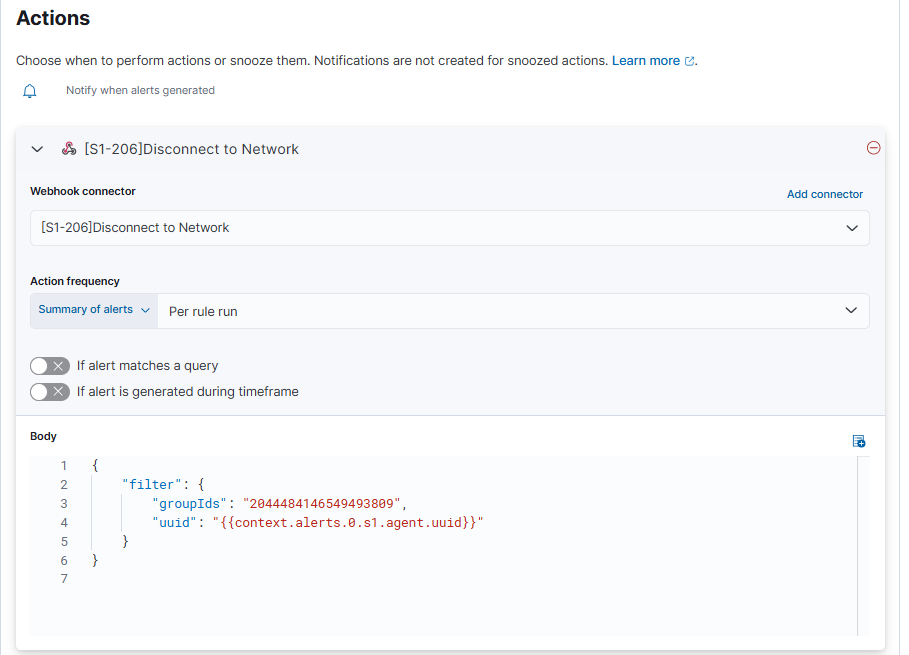
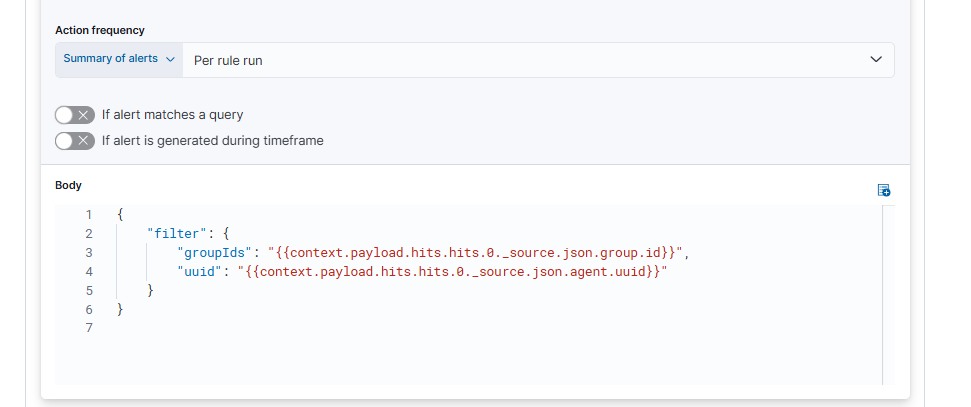
running multiple config for logstash
./logstash -f first.conf
./logstash -f second.conf
./logstash -f third.conf
config/pipelines.yml
- pipeline.id: my_first_pipeline
path.config: "/path_to_first_pipeline.conf"
- pipeline.id: my_second_pipeline
path.config: "/path_to_second_pipeline.conf"
listener
#!/bin/bash

while true; do
  # Listen for incoming HTTP requests on port 8080 and send a simple HTML response
  {
    echo -ne "HTTP/1.1 200 OK\r\nContent-Type: text/html\r\n\r\n"
    echo -ne "<html><body><h1>Hello from Shell HTTP Server!</h1></body></html>"
  } | nc -l -p 8080 -q 1
done
#!/bin/bash

while true; do
  # Listen for incoming requests on port 8080, and show the request body
  echo "Waiting for incoming request on port 8080..."

  # Capture the incoming request and echo it to the console
  nc -l -p 8080 -q 1 | tee /dev/tty | head -n 20   # Limit to the first 20 lines of the request
done
nc -l -p 8080: Listens on port 8080 for incoming HTTP requests
tee /dev/tty: Copies the request to both the terminal (stdout) and the rest of the pipeline.
head -n 20: Limits the output to the first 20 lines, so you don't see too much of the incoming request at once (since HTTP headers and body can be long)
curl -X POST http://localhost:8080 \
-H "Content-Type: application/x-www-form-urlencoded" \
-d "name=JohnDoe&age=25"
'제품 > ELK' 카테고리의 다른 글
| logstash jdbc input 플러그인 (0) | 2025.03.27 |
|---|---|
| Webhook 커넥터 테스트 (0) | 2025.02.22 |
| 로그스태시로 데이터베이스에서 레코드 가져오기 (0) | 2025.02.13 |
| ES|QL 쿼리 (0) | 2025.02.09 |
| 로그스태시 - RDBMS 데이터를 Elasticsearch에 넣기 (0) | 2025.01.27 |

