개 요
Elasticsearch의 기본 스크립팅 언어는 Painless입니다. Elasticsearch는 대규모 데이터 세트에서 실시간 검색 및 분석을 지원하는 플랫폼으로, 이를 위해 안정적이고 효율적인 스크립팅 언어가 필요한데, Painless는 이러한 요구 사항을 충족시키기 위해 특별히 설계되었습니다. 검색, 정렬, 집계 등 다양한 용도로 사용되어 지고 있음을 예제를 통해 보여드릴께요.
우선 샘플 데이터 인덱싱을 먼저 합니다.
POST _bulk
{ "index" : { "_index" : "member", "_id" : "1" } }
{ "name" : "sally", "salary": 4000, "job": "Dancer" }
{ "index" : { "_index" : "member", "_id" : "2" } }
{ "name" : "john", "salary": 6000, "job": "Engineer" }
{ "index" : { "_index" : "member", "_id" : "3" } }
{ "name" : "alice", "salary": 5500, "job": "Teacher" }
{ "index" : { "_index" : "member", "_id" : "4" } }
{ "name" : "mike", "salary": 4800, "job": "Developer" }
{ "index" : { "_index" : "member", "_id" : "5" } }
{ "name" : "emily", "salary": 5200, "job": "Nurse" }
{ "index" : { "_index" : "member", "_id" : "6" } }
{ "name" : "david", "salary": 5100, "job": "Architect" }
painless 스크립트
물가도 올랐으니, 올해는 salary가 2배씩 올랐으면하는 바램을 스크립트로 나타내면 다음과 같습니다.
GET member/_search
{
  "script_fields": {
    "my_doubled_salary": {
      "script": {
        "source": "doc['salary'].value * 2"
      }
    }
  }
}
만약 2배가아니라 3배로 값을 변경해야 할 경우, 위 스크립트는 다시 컴파일되어야 합니다. 스크립트를 수정하지 않고도 변수를 변경할 수 있도록 파라미터를 사용하면 Elasticsearch는 새로운 값을 적용할 때 다시 컴파일하지 않아도 됩니다. 이렇게 하면 성능을 최적화하고 실행 시간을 절약할 수 있습니다.
파라미터 이용하기
GET member/_search
{
  "script_fields": {
    "my_doubled_salary": {
      "script": {
        "source": "doc['salary'].value * params['multiplier']",
        "params": {
          "multiplier": 2
        }
      }
    }
  }
}
스크립트 따로 저장하기
스크립트를 따로 저장하고 필요할 때마다 실행하면 더 편리하겠죠.
POST _scripts/my_doubled_salary
{
  "script": {
    "lang": "painless",
    "source": "doc['salary'].value * params['multiplier']"
  }
}GET _scripts/my_doubled_salary
다음이 반환됩니다. 스크립트가 잘 저장되었는지 알 수 있습니다.
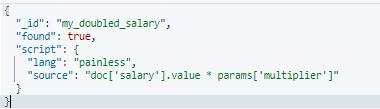
저장된 스크립트를 호출하는 방법은 다음과 같습니다. 스크립트 대신 스크립트 _id를 적어주면 됩니다.
GET member/_search
{
  "script_fields": {
    "my_doubled_salary": {
      "script": {
        "id": "my_doubled_salary",
        "params": {
          "multiplier": 2
        }
      }
    }
  }
}
스크립트 삭제
저장된 스크립트는 삭제하려면 다음처럼 하세요.
DELETE _scripts/my_doubled_salary
스크립트로 도큐먼트 업데이트하기
여기서 우리는 ctx라는 특별한 변수를 보게 됩니다. ctx는 업데이트 쿼리의 경우 사용할 수 있는 특수 변수로, ctx가 현재 문서를 보유합니다. 그럼 모든 멤버의 월급을 10배로 올립니다.
POST member/_update_by_query
{
  "script": {
    "source": "ctx._source.salary *= 100",
    "lang": "painless"
  }
}
GET member/_search
예제
- def
def 타입 변수를 선언하면 어떤 타입의 값이든 할당할 수 있습니다.
    def v1 = ctx.s1?.src?.process?.parent?.cmdline;
    def v2 = ctx.s1?.tgt?.process?.cmdline;
- instanceof
instanceof 연산자는 변수/필드 타입을 지정된 참조 타입과 비교하는데, 참조 타입과 동일하면 true를, 그렇지 않으면 false를 반환합니다.
# v1의 타입이 String이며 true, 아니면 false를 반환
# v1의 타입이 String이고 null이 아니면

if (v1 instanceof String && v1 != null) {
	v1 = trimQuotes(params.double_quote, v1);
    ctx.s1.src.process.parent.put("cmdline", v1);
}

if (v2 instanceof String && v2 != null) {
    v2 = trimQuotes(params.double_quote, v2);
    ctx.s1.tgt.process.put("cmdline", v2);
  }
- 함수
함수는 특정 작업을 수행하는 코드 블록으로, 이름을 부여하여 정의합니다. 함수는 반환 타입 값을 지정하는데, 반환 타입이 void인 경우에는 값이 반환되지 않습니다. 문자열에서 doubleQuote를 제거하고 문자만 추출하는 함수를 정의해봅시다.
# 변수 v에 담긴 문자열이 doubleQuote로 감싸져 있다면,
# 문자열 v에서 두 번째 문자부터 마지막 전 문자까지의 부분 문자열을 추출합니다.

String trimQuotes(def doubleQuote, def v) {
	if (v.startsWith(doubleQuote) && v.endsWith(doubleQuote)) {
    	v = v.substring(1, v.length() - 1);
    }
    return v;
}
Painless 스크립트의 시작 부분에 함수들을 선언할 수 있습니다.
String trimQuotes(def doubleQuote, def v) {
	if (v.startsWith(doubleQuote) && v.endsWith(doubleQuote)) {
    	v = v.substring(1, v.length() - 1);
    }
    return v;
}

def v1 = ctx.s1?.src?.process?.parent?.cmdline;
def v2 = ctx.s1?.tgt?.process?.cmdline;
if (v1 instanceof String && v1 != null) {
    v1 = trimQuotes(params.double_quote, v1);
    ctx.s1.src.process.parent.put("cmdline", v1);
}
if (v2 instanceof String && v2 != null) {
    v2 = trimQuotes(params.double_quote, v2);
    ctx.s1.tgt.process.put("cmdline", v2);
}
ingest pipeline에서 문자열에서 " 을 제거하는 script 프로세서를 다음처럼 작성할 수 있습니다.
  {
    "script": {
      "description": "Script to remove quotes from begining and end from a field.",
      "tag": "script_to_remove_quotes_from_begining_and_end",
      "source": """String trimQuotes(def doubleQuote, def v) {
        if (v.startsWith(doubleQuote) && v.endsWith(doubleQuote)) {
          v = v.substring(1, v.length() - 1);
        }
      return v;
      }
      def v1 = ctx.s1?.src?.process?.parent?.cmdline;
      def v2 = ctx.s1?.tgt?.process?.cmdline;
      if (v1 instanceof String && v1 != null) {
        v1 = trimQuotes(params.double_quote, v1);
        ctx.s1.src.process.parent.put("cmdline", v1);
      }
      if (v2 instanceof String && v2 != null) {
        v2 = trimQuotes(params.double_quote, v2);
        ctx.s1.tgt.process.put("cmdline", v2);
      }
      """,
      "lang": "painless",
      "params": {
        "double_quote": "\""
      },
      "on_failure": [
        {
          "append": {
            "field": "error.message",
            "value": "Processor {{{_ingest.on_failure_processor_type}}} with tag {{{_ingest.on_failure_processor_tag}}} in pipeline {{{_ingest.pipeline}}} failed with message: {{{_ingest.on_failure_message}}}"
          }
        }
      ]
    }
}'제품 > ELK' 카테고리의 다른 글
| 로그스태시 - RDBMS 데이터를 Elasticsearch에 넣기 (0) | 2025.01.27 |
|---|---|
| Logstash에서 민감한 설정 보호하기: Keystore사용법 (0) | 2025.01.19 |
| 타임스탬프 (0) | 2024.10.15 |
| 인제스트 파이프라인 (0) | 2024.10.01 |
| [Logstash] 멀티라인 이벤트 처리하기 (0) | 2024.08.12 |
